Hotkeys stopped working in Goldsim 15

Answered

Comments

4 comments

  • Avatar
    Jason

    Hi Nikhil,

    Thanks for bringing this to our attention. I realize this is probably something you've tried but if not, please restart the computer as well. Given that, can you also try some other shortcut keys just to see if it is isolated to Ctrl c/v? What happens (in GoldSim 15) when you do Ctrl+S to save the model? What about F2 (simulation settings)? 

    Can you please try the GoldSim Player 15 as well? Does it have the same problem?

    Also, what version of Windows are you using?

    -Jason

    0
    Comment actions Permalink
  • Avatar
    Nikhil Pillai

    Yes, I've tried restarting the computer but that didn't fix it. None of the shortcut keys of function keys seems to work. That is including Ctrl+S to save or F2 for simulation settings. The copy-paste shortcut works for copying texts in the model, but not elements.

    The available function keys work for GoldSim Player 15 (F5 Run, F4 Edit).


    Edition    Windows 11 Business
    Version    23H2

    0
    Comment actions Permalink
  • Avatar
    Jason

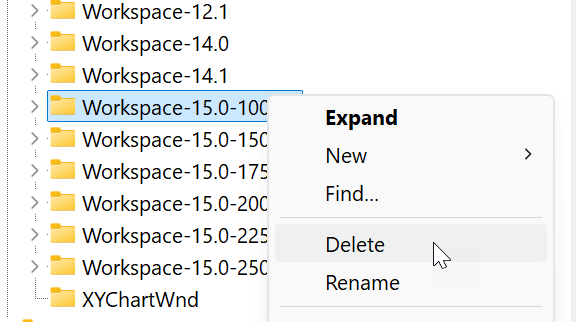
    Thanks for following up, Nikhil. In that case, please try the following change in the Windows Registry. Please be careful when working in the registry. Note you will need administrator privileges to do this:

    1. Close all instances of GoldSim
    2. Start the Windows Registry: start key - "Registry Editor"
    3. Browse to HKEY_CURRENT_USER\Software\GTG\GoldSim
    4. Find the "Workspace-15.0" folder
    5. Left click to highlight it.
    6. Right click and choose Delete.


    Let's see if that works.

    -Jason

    1
    Comment actions Permalink
  • Avatar
    Nikhil Pillai

    Hi Jason,

    Yes, that worked!

    Thank you

    0
    Comment actions Permalink

Please sign in to leave a comment.