GSPy syntax and limitations

Answered

Comments

5 comments

  • Avatar
    Stefan Knopf

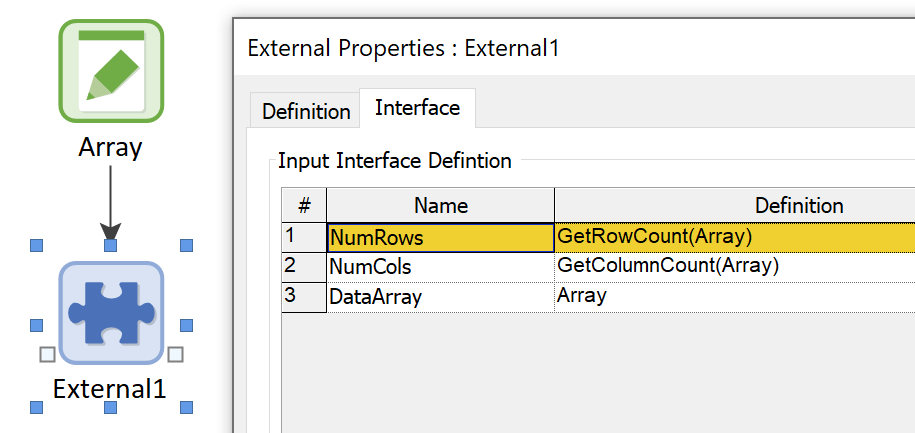
    This can be done in a dynamic way. It is recommended that you pass the array's dimensions as individual parameters to the DLL. The image below 3 parameters. The first and second parameters pass the Array's number of rows and columns. The third parameter is the array output itself. In your code you can then loop over the array in any way you want.

    1
    Comment actions Permalink
  • Avatar
    Page Weil

    Thank you for this, though I don't know how I would have found this on my own. Is there more detailed documentation on GSPy?

    I have read both the "GSPy Developer Guide" and "GSPy End User Guide", and while these are helpful, these are not formal documentation. Is there a list somewhere of all the functions/limitations/code elements for GSPy? 

    I see that numpy can be run using GSPy. Is that the only Python library that is implemented along with GSPy? What about Pandas?

    1
    Comment actions Permalink
  • Avatar
    Jason

    Hi Page,

    Thank you for the detailed questions. 

    You can handle dynamic arrays in GSPy. When you link a GoldSim vector to GSPy, it arrives in your Python script as a single list. You can then use the standard Python len() function to find its size inside your goldsim_calculate function. For example:   

    def gspy_info():
        return {'inputs': 1, 'outputs': 2}  # 1 vector input, 2 scalar outputs

    def goldsim_calculate(inputs):
        """Process a dynamic vector from GoldSim."""
        # Get the vector (arrives as a Python list)
        data_vector = inputs.get('input1', [])
        
        # Dynamic size detection
        vector_size = len(data_vector)
        
        # Process the vector (example: calculate mean and max)
        if vector_size > 0:
            vector_mean = sum(data_vector) / vector_size
            vector_max = max(data_vector)
        else:
            vector_mean = 0.0
            vector_max = 0.0
        
        return {
            'output1': vector_mean,
            'output2': vector_max
        }

    Which Python libraries are supported? You can use any standard Python library you have installed in your environment, including Pandas, SciPy, Matplotlib, etc. When your gspy_script.py runs, it behaves like any other Python script and can import any installed library.

    Where is the formal documentation? The documentation for this open-source tool is its GitHub repository, which you can find here: https://github.com/GoldSim/gspy. On that site, the README.md file is the primary user guide, detailing the setup and common patterns like the dynamic array handling I described above.

    Let me know if this helps.
    -Jason
    0
    Comment actions Permalink
  • Avatar
    Page Weil

    Jason

    I tried to implement the script you provided above and GSPy is giving me an error that appears that it doesn't know how to handle that dynamic array size:

    The following error was found in the model.  To continue, you must resolve this error.
    External element \Python_Test input arguments do not match
    External function is expecting 1 inputs, 4 arguments are defined in GoldSim

    I created an example starting from the demo GSPy goldsim files for this dynamic vector reading and emailed it to you (I can't attach files here). If you can, please let me know if I am doing something obviously wrong.

    Once we resolve this, the other question is how to handle a mix of inputs (vectors and scalars)? Do we just have to know the relative size and position in the inputs of each one (eg, first value in input list is dimension, next 50 values are the values for the array, next value is dimension of 2nd array, next 50 values are values in the second array, etc)?

    Thanks

    Page

    1
    Comment actions Permalink
  • Avatar
    Jason


    Hi Page,

    I'm not able to download the zip you gave me. Perhaps a call is better. I'll reply to the email with a meeting time. What I will want to see are the details about the data you want to pass back and forth.

    Best regards,

    Jason


    0
    Comment actions Permalink

Please sign in to leave a comment.